Amanda Enterprise
Amanda Enterprise is a fully automated, enterprise-grade client lifecycle system built entirely in n8n.
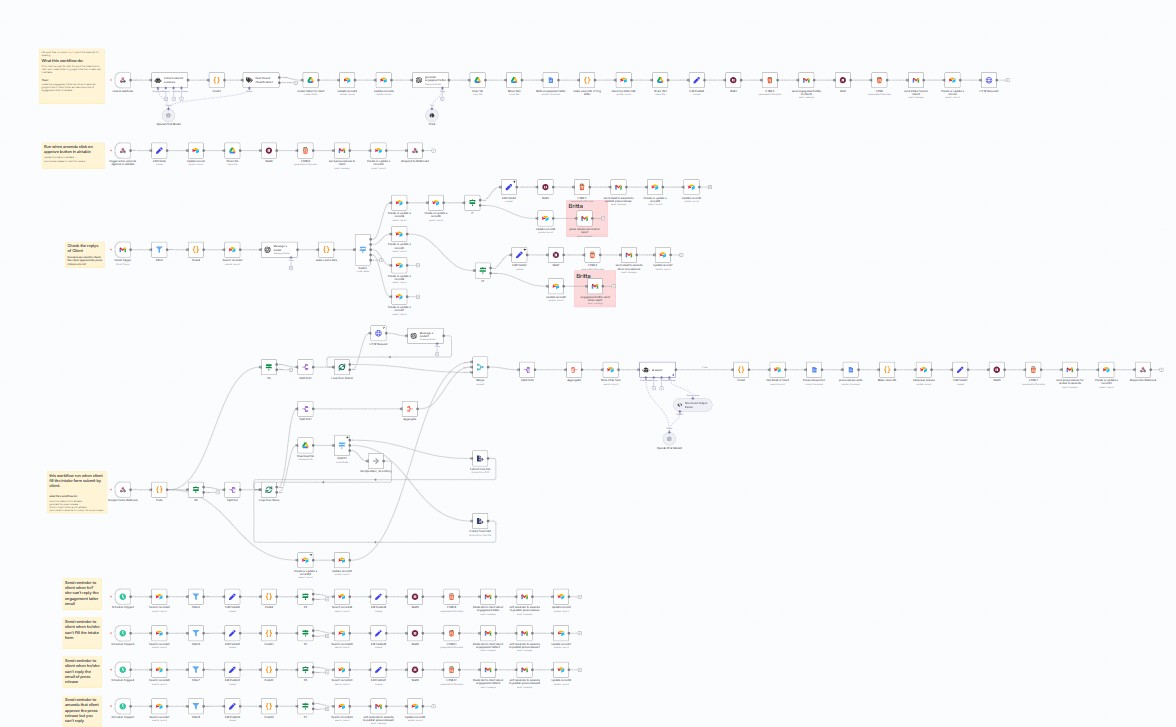
Multiple client teams juggling ClickUp, Airtable, Supabase, and GoHighLevel — every task classification, routing decision, and status update was manual. Ops overhead compounded per client.
One 190-node n8n orchestration layer sitting between all four platforms. LLM-driven task classification, autonomous routing, real-time cross-system syncs. Custom TypeScript nodes for platform-specific logic. Multi-tenant from day one.
High-Level Architecture
Master Orchestrator (n8n)
├── Client Intake & Asset Collection
├── AI Transcript & Data Processing
├── Document Generation Engine
├── Approval State Machine
├── Publishing & Archiving
└── Notification & Monitoring System
Workflow breakdown
Phase 1: Client Intake & Asset Collection
Automated ingestion and processing of client information and assets
- Trigger: Client call completed, transcript automatically ingested
- AI Processing: Call summarization, entity extraction (company, industry, objectives), intent & sentiment classification
- Asset Collection: Client URLs (website, social profiles), image assets (logos, headshots, product images), PDF assets (brochures, reports, prior publications)
- Validation & Storage: File type and size validation, structured Google Drive folder creation, metadata indexing in Airtable
Phase 2: AI-Driven Document Drafting
Intelligent document creation using AI
- Industry-based template selection
- Automated press release drafting
- Smart content placement using extracted assets
- Initial formatting and structure validation
- Outputs: Internal working draft, status logged in Airtable
Phase 3: Multi-Format Document Generation
Dynamic content injection and multi-format output
- Dynamic Content Injection: Hyperlinked URLs, auto-resized and positioned images, extracted PDF quotes and data
- Generated Formats: Google Docs (editable), PDF (client-ready), HTML (email compatible), social media snippets
Phase 4: Client Approval State Machine
Critical system component implementing state-driven approval workflow
- Approval States: PENDING → SENT → VIEWED → APPROVED → PUBLISHED / REJECTED → REVISION / CHANGES_REQUESTED → REVISION / NO_RESPONSE → ESCALATION
- Automated Behaviors: Approval timestamp logging, change request parsing, revision task creation
- Follow-up reminders (Day 3 / Day 7 / Day 14)
- Escalation to internal owner
Phase 5: Final Assembly & Publishing
Quality control and publication pipeline
- Final content merge
- Quality control validation
- Version locking
- Archive to long-term storage
- Publishing queue handoff
Phase 6: Modular Processing Lanes
Three parallel sub-workflows demonstrating reusable n8n design
- Press Release Pipeline: Template logic, asset injection, formatting, version control (~35–40 nodes)
- Proposal Generation Pipeline: Pricing logic, terms insertion, client-specific customization (~35–40 nodes)
- Contract & Engagement Pipeline: Legal document assembly, e-signature integration, compliance checks, secure archiving (~35–40 nodes)
Technical highlights
Asset Management Engine
Assets = {
  urls: { validate: true, autoLink: true },
  images: {
    formats: ["jpg", "png", "svg"],
    maxSize: "5MB",
    processing: "resize + optimize"
  },
  pdfs: {
    extraction: "text + metadata",
    secureStorage: true
  }
}
Error Handling Strategy
- Section-level try/catch logic
- Centralized Airtable error logging
- Automatic retries for transient API failures
Performance Optimization
- Rate-limited API calls
- Parallel execution where safe
- Async handling for non-blocking tasks
Monitoring & Reporting
- Airtable dashboard: Client status, approval stage, time-to-publish metrics
- Execution success tracking
- Manual override controls
Why this matters
Demonstrates advanced n8n architecture design
Shows large-scale automation planning capabilities
Implements state-driven logic at enterprise scale
Proves n8n can operate as a true enterprise platform
Replaces multiple SaaS tools with a single, maintainable automation system